
What Is the Best 96% Mechanical Keyboard for Gaming and Productivity?
Summary
A comprehensive buyer's guide to the best 96% mechanical keyboards for gaming and productivity, targeting gamers, typists, and enthusiasts. Covers Royal Kludge models (RK96, RKM96), switch types (linear/tactile/hall effect), wireless tech, budget vs. premium tiers, and includes a comparison table, FAQ, and sourced citations. Core argument: the 96% layout delivers a full key set in a compact, desk-friendly footprint, making it the optimal choice for users who need both numpad and space efficiency.
Details
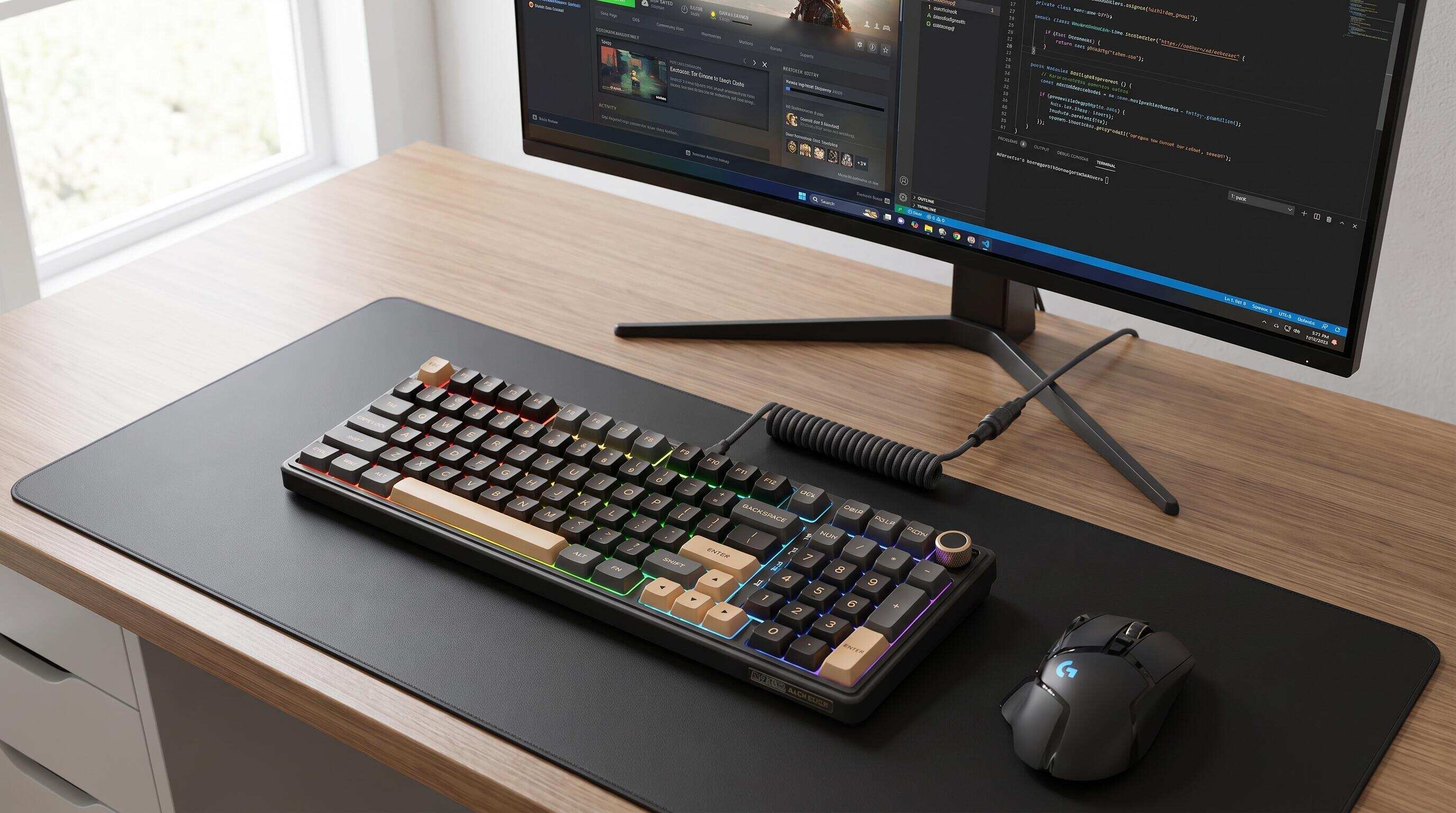 ALT: Best 96% mechanical keyboard for gaming and productivity on a clean desk setup
The 96% Layout Is the Sweet Spot — Here Are the Best Mechanical Keyboards That Prove It
The 96% mechanical keyboard layout is a compact-yet-complete form factor that retains the number pad, function row, and arrow cluster while trimming unnecessary dead space between key groups. For gamers who need every key at their fingertips and productivity users who can't live without a numpad, the 96% layout represents a rare engineering compromise that satisfies both worlds simultaneously. As hardware reviewers at outlets such as Tom's Hardware and rtings.com have noted, demand for dense, full-featured layouts has grown steadily as desks get more crowded and users grow more discerning about every centimeter of surface space.
This article walks through the top features, switch types, and design factors that define the best 96% mechanical keyboards available today — including standout options from Royal Kludge (RK), a global gaming peripheral brand known for fusing cutting-edge technology with minimal, functional design. Whether you're chasing low-latency dominance in competitive gaming or hunting for a tactile, satisfying typing experience through a ten-hour work sprint, this guide was assembled with a single goal: helping you find the right board.
Items were selected based on a combination of technical merit, real-world usability signals, switch quality, build materials, connectivity options, and value for money. Each entry below is evaluated through the lens of both gaming performance and daily productivity demands — because the best 96% keyboard should never force you to choose between the two.
The Best 96% Mechanical Keyboards for Gaming and Productivity
Royal Kludge R98 Pro— A Customizable Wired Mechanical Powerhouse
The Royal Kludge R98 Pro is a 96% wired mechanical keyboard with a 98-key layout that retains the number pad, arrow keys, and essential function keys while saving valuable desk space. Rather than focusing on wireless flexibility, this model emphasizes a refined typing experience, practical controls, and extensive customization. Its gasket-mounted structure and multi-layer sound-dampening design help create a softer, more satisfying typing feel with the distinctive creamy sound that many mechanical keyboard enthusiasts enjoy.
The R98 Pro comes equipped with pre-lubed linear Cream switches designed for smooth keystrokes, along with hot-swappable sockets that support compatible 3-pin and 5-pin switches without soldering. Its double-shot PBT keycaps feature an MDA profile, combining a durable, fade-resistant finish with a comfortable typing surface. For added convenience, the detachable CNC aluminum volume knob provides quick audio adjustments, while dynamic RGB backlighting offers more than 20 lighting modes. Users can also customize key assignments, macros, and lighting effects through RK's online driver, which supports Windows and macOS. You can find the Royal Kludge R98 Pro wired mechanical keyboard and explore its features directly on Amazon.
Best for: Gamers, programmers, and remote workers who want a compact 98-key layout, a smooth typing experience, and the freedom to customize switches, lighting, and key functions.
Watch out: The R98 Pro is a wired-only keyboard, connecting through USB-C rather than Bluetooth or 2.4 GHz wireless. If wireless connectivity is essential to your setup, consider a tri-mode alternative. Its compact layout also requires some desk space for the number pad, so measure your available workspace before buying.
Royal Kludge R98 Pro — Smooth Mechanical Typing with Customizable Control
The Royal Kludge R98 Pro is a 96% wired mechanical keyboard featuring 98 keys, pre-lubed linear cream switches, and a hot-swappable design that lets users replace compatible switches without soldering. Unlike magnetic Hall effect keyboards, the R98 Pro focuses on a smooth, consistent typing experience with practical customization options. Its gasket-mounted structure and multi-layer sound-dampening design help create a softer typing feel and a satisfying, creamy sound profile, making it suitable for both gaming and everyday productivity.
RK's R98 Pro combines a space-efficient layout with features designed for users who want performance and personalization without sacrificing essential keys. The compact 96% layout retains a dedicated number pad, while the detachable aluminum volume knob provides convenient audio control. Double-shot PBT keycaps with an MDA profile offer a comfortable, durable typing surface, and customizable RGB backlighting lets users personalize their desk setup. The keyboard also supports programmable key assignments, macros, and lighting effects through RK's online driver. For users looking for a customizable wired mechanical keyboard with smooth linear switches, explore the RK Royal Kludge R98 Pro mechanical keyboard listing for its full feature breakdown.
Best for: Gamers, office users, programmers, and mechanical keyboard enthusiasts who want a compact 98-key layout, smooth linear switches, hot-swappable customization, and convenient volume controls.
Watch out: The R98 Pro is a wired mechanical keyboard, not a magnetic Hall effect model. Its standard mechanical switches do not provide the adjustable actuation points or Rapid Trigger functionality associated with Hall effect keyboards. Before purchasing, check the switch type, USB-C wired connectivity, and compatibility requirements to make sure they match your setup.
Royal Kludge R98 Pro RGB Hot-Swap Edition — The Customizer's Starting Point
The R98 Pro hot-swap edition is the gateway keyboard for anyone curious about the mechanical keyboard hobby. Hot-swap sockets — PCB-mounted connectors that grip switch pins without solder — allow you to swap out the stock switches for any MX-compatible alternative in minutes. This is genuinely transformative for beginners: you can buy a board with linear switches, decide you prefer tactile feedback, and simply pull the old switches out with an included puller tool and press new ones in. No electronics experience required.
What makes this particularly compelling in a 96% layout is that every position is hot-swappable, including the numpad and function row, meaning the entire typing and gaming experience can be redesigned without purchasing a new keyboard. In our work observing how enthusiasts build their setups, we consistently see this flexibility turn casual buyers into dedicated collectors — once you've swapped switches, you start noticing acoustics, stabilizer rattle, and foam dampening, and the rabbit hole deepens. A solid RK hot-swap mechanical keyboard is often the first step on that journey.
Best for: Keyboard hobbyists and beginners who want room to experiment with switch types without committing to a single feel permanently.
Watch out: Hot-swap sockets can develop loose connections after many swap cycles if switches are inserted at an angle; always align pins carefully and avoid forcing switches in.
Tactile Switch 96% Keyboards — For Typists Who Game
Tactile switches are mechanical switches that produce a distinct physical bump midway through the keypress, providing physical confirmation that a keystroke has registered without requiring the key to bottom out. For productivity-heavy users — writers, coders, analysts — tactile switches reduce finger fatigue because your fingers learn to ride the bump rather than hammer each key to the floor. In gaming, tactile switches can improve deliberate key presses like ability activations in strategy games or UI navigation, though they are less ideal for the rapid, repeated inputs demanded by shooters.
When choosing a 96% keyboard around tactile switches, the layout density works in your favor: all your tools are present, the tactile feedback keeps long typing sessions comfortable, and the compact footprint leaves more desk space for your mouse. The wider keyboard community, including reviewers at Eurogamer's Digital Foundry, regularly highlights how the 96% form factor pairs particularly well with premium tactile switches because users at this price tier tend to split time between work and play. As a guide to understanding which switch type suits your budget and habits, the article Choosing the Best Switch for Your Budget: A Mechanical Keyboard Primer This Quarter offers a thorough breakdown.
Best for: Writers, programmers, and strategy gamers who value deliberate, confirmed keystrokes over raw speed.
Watch out: Tactile switches with a heavier actuation force can cause finger fatigue during marathon gaming sessions involving rapid repeated keypresses, such as in fighting games.
Linear Switch 96% Keyboards — Smooth, Silent, and Built for Speed
Linear switches travel from top to bottom in a single, uninterrupted motion with no tactile bump and no audible click. They are the preferred choice of competitive FPS and battle-royale players because the smooth travel enables faster repeated keypresses — critical for movement keys like W, A, S, D where milliseconds of hesitation compound over a match. Many professional esports players, as documented in peripheral manufacturer studies and gaming journalism, have standardized on linear switches for this reason.
In the context of a 96% keyboard, linear switches deliver another advantage: office environments and shared spaces. If you work from home or in an open plan office, linear switches (especially those paired with sound-dampening foam inside the keyboard case) produce a significantly quieter sound profile than tactile or clicky alternatives. The numpad presence in a 96% board becomes a genuine productivity asset when number entry is smooth and silent. Pairing a linear-switch 96% board with a quality desk mat completes a setup that performs and sounds premium without disturbing anyone within earshot.
Best for: Competitive FPS gamers and hybrid home-office users who need speed and acoustic discretion in equal measure.
Watch out: The lack of tactile feedback means beginners may bottom out every keypress initially, increasing both noise and finger fatigue until muscle memory develops.
Wireless 96% Keyboards with 2.4 GHz Dongle — Gaming-Grade Latency, Cord-Free
A 2.4 GHz wireless keyboard uses a small USB dongle to communicate with the keyboard over a dedicated radio frequency, achieving latency figures that rival — and in many tests match — wired connections. This distinguishes 2.4 GHz wireless from Bluetooth: Bluetooth is designed for broad device compatibility and energy efficiency, while 2.4 GHz dongles are optimized for the consistent, low-latency signal that gaming demands. For players who have hesitated to go wireless due to concerns about input delay, 2.4 GHz connectivity is the answer that removes that hesitation.
The 96% layout is an excellent canvas for wireless technology because the slightly larger battery capacity available compared to smaller form factors (like 60% boards) means longer battery life without inflating the footprint. In practice, a well-designed wireless 96% keyboard can last through multiple gaming sessions before requiring a charge, especially when RGB is set to moderate brightness. If you're curious about how the 96% layout stacks up against smaller wireless options, the comparison article 60% vs 75% vs 80% vs Full-Size Keyboards: Which Layout Fits Your Setup in 2026? provides a direct side-by-side of form factors.
Best for: Gamers who want a cable-free setup without compromising competitive-level input responsiveness.
Watch out: The 2.4 GHz dongle occupies a USB port; in a crowded hub setup, keep the dongle as close to the keyboard as possible to maintain a clean signal.
Budget 96% Mechanical Keyboards — High Layout, Lower Cost
Budget 96% keyboards are mechanical keyboards in the 96% form factor priced to be accessible to first-time buyers or users upgrading from a membrane keyboard. The term "budget" is relative — at this tier, the keyboards typically include genuine mechanical switches, double-shot or dye-sublimated keycaps, and at least basic software for lighting configuration. What differentiates them from premium models is build material (usually polycarbonate or ABS plastic cases instead of aluminum), fewer connectivity options, and often soldered rather than hot-swappable switches.
A pattern consistently seen in the wider mechanical keyboard community is that entry-level 96% keyboards convert more users to the hobby than any other segment. The full key complement removes the concern of missing a numpad or function row, and the lower price reduces the anxiety of commitment. RK keyboards in particular occupy a strong position here — the brand has built its reputation on delivering genuine mechanical performance at approachable price points, reflecting the core philosophy that high-quality gaming peripherals should not be out of reach.
Best for: First-time mechanical keyboard buyers and students who want a complete layout without a premium price tag.
Watch out: Budget boards may have less sound dampening inside the case, leading to a louder, hollower sound profile that bothers some users; adding a desk mat and typing with slightly lighter keypresses helps manage acoustics.
Premium Aluminum 96% Keyboards — For the Setup That Demands Excellence
Aluminum-case 96% keyboards represent the top of the market: boards where the chassis is machined or die-cast from metal, producing a rigid, weighty, acoustically rich typing experience that plastic cases cannot replicate. The mass of an aluminum frame absorbs vibration differently, producing a deeper, more "thocky" sound signature that mechanical keyboard enthusiasts describe as one of the most satisfying sensory experiences in the hobby. For content creators who stream or record, an aluminum keyboard on camera also communicates quality and craft in a way that resonates with audiences.
Premium 96% boards in this tier typically pair their aluminum cases with premium stabilizers (the components that balance the longer keys like Space, Shift, and Enter), POM or polycarbonate plates for plate flex, and hand-lubed switches from the factory. The result is a keyboard that feels custom even before any aftermarket modification. For productivity users spending upwards of eight hours at their desk, the improved ergonomic feel of a high-mass, well-tuned board translates to a more pleasurable daily experience — not a trivial consideration over months of use.
Best for: Keyboard enthusiasts, content creators, and professionals who want a showcase-quality board that performs as well as it looks and sounds.
Watch out: Aluminum cases are significantly heavier than plastic alternatives; if you frequently travel with your keyboard, the added weight is a real-world consideration.
Quick Comparison at a Glance
| Item | Best For | Key Strength | Limitation |
|---|---|---|---|
| 96% Wireless | Gaming and remote work | Tri-mode connectivity | Battery drains faster with RGB |
| 96% Magnetic | Competitive esports | Rapid trigger, adjustable actuation | Setup time required for optimization |
| 96% Hot-Swap Edition | Enthusiasts and beginners | Switch customization without soldering | Socket wear after many swap cycles |
| Tactile Switch 96% | Writers and strategy gamers | Confirmed, fatigue-reducing keypress | Heavy actuation tires fingers in fast gaming |
| Linear Switch 96% | FPS gamers and office users | Speed and acoustic discretion | No tactile feedback requires adaptation |
| 2.4 GHz Wireless 96% | Gamers going cord-free | Gaming-grade low latency | Dongle occupies a USB port |
| Budget 96% | First-time buyers | Full layout at accessible price | Less sound dampening; fewer materials |
| Premium Aluminum 96% | Enthusiasts and creators | Acoustic quality; premium build | Heavier weight; higher cost |
How to Choose the Right 96% Mechanical Keyboard
The best 96% mechanical keyboard for you is the one that matches your primary use case first, then satisfies your secondary needs — not the one with the longest feature list.
If you play competitive online games as your primary activity, prioritize a keyboard with a 2.4 GHz wireless or wired connection, linear switches for fast repeated inputs, and — if budget allows — hall effect technology like the R98 Pro for rapid trigger capability. Actuation speed and input consistency should drive your decision above all else.
If you work at a desk for most of the day and game in the evenings, look for a hot-swappable board so you can tune the switch feel over time without buying multiple keyboards. A tactile switch for productivity hours can be swapped for a linear switch for gaming nights once you know what you prefer — this is the beauty of hot-swap technology.
If you are buying your first mechanical keyboard, start with a reputable budget 96% board that includes hot-swap support. This gives you the complete layout familiar from a standard desktop keyboard, genuine mechanical switch feedback, and the flexibility to experiment. Royal Kludge keyboards at this tier deliver all three without overcomplicating the decision.
If your setup is part of your brand — you stream, create video content, or maintain an aesthetically curated workspace — invest in a premium aluminum 96% keyboard. The sound, the weight, and the visual presence all signal a level of commitment and craft that budget boards cannot match.
A common misconception is that the 96% layout is a compromise version of a full-size keyboard. It is not. The 96% layout achieves the same complete key count as a standard 104-key board — including the numpad — by eliminating redundant spacing between key clusters, not by removing any keys. If you need every key, the 96% gives you every key in a tighter, more desk-friendly package.
 ALT: 96% mechanical keyboard layout comparison showing numpad, function row, and arrow keys for gaming and productivity use
Frequently Asked Questions FAQ
Q1: How does a 96% keyboard differ from a full-size or TKL layout?
A 96% keyboard retains all the keys of a full-size 104-key board — including the numpad, function row, and navigation cluster — but removes the spacing gaps between key groups to reduce overall width. A tenkeyless (TKL) keyboard, by contrast, removes the numpad entirely. The 96% layout is the ideal choice for users who need every key but want a more compact footprint than a traditional full-size board.
Q2: Is a wireless 96% mechanical keyboard suitable for competitive gaming?
A wireless 96% keyboard with a dedicated 2.4 GHz dongle is suitable for competitive gaming. Modern 2.4 GHz wireless implementations achieve latency comparable to wired connections, and reviews by outlets such as Tom's Hardware and rtings.com have documented that top wireless gaming keyboards perform at parity with their wired counterparts in input tests. Bluetooth, however, introduces higher and less consistent latency, and is better suited to productivity tasks than competitive gaming.
Q3: How long does the battery last on a wireless 96% mechanical keyboard?
Battery life on a wireless 96% keyboard varies based on RGB brightness, usage patterns, and the specific power management design of the board. As a general rule, turning RGB off or reducing brightness dramatically extends battery life — many wireless 96% keyboards last several days to a few weeks on a single charge without RGB, and significantly shorter with full-brightness lighting. Checking the manufacturer's specifications for your specific model is the most reliable way to set accurate expectations.
Summary
The 96% mechanical keyboard layout is the most complete compact form factor available, combining every key a gamer or productivity user needs with a reduced desk footprint that improves mouse range and setup aesthetics.
Key Takeaways:
- The 96% layout includes the numpad, function row, and arrow cluster — no keys are sacrificed, only spacing is reduced.
- Hall effect magnetic keyboards like the RK R98 Pro offer adjustable actuation and rapid trigger, providing a genuine competitive advantage in esports.
- Hot-swap sockets transform any 96% board into a platform for switch experimentation, making them ideal for both beginners and enthusiasts.
- Switch type — linear for speed, tactile for deliberate typing — should be the first decision after choosing the layout, as it defines the core feel of the keyboard.
- Premium aluminum cases deliver superior acoustics and build quality for users who demand the best, while budget 96% boards make the complete layout accessible to everyone.
If you've identified the use case and features that fit your setup, the next step is straightforward: match your budget to the tier that delivers the performance you need, and prioritize hot-swap capability if you expect your preferences to evolve.
Ready to upgrade your setup? Discover the RK R98 Pro Mechanical Keyboard, featuring a compact 98-key layout, hot-swappable switches, customizable RGB lighting, and a convenient volume knob. Combining practical functionality with personalized customization, it’s a great choice for users looking to enhance their typing and gaming experience.
Sources & Citations
- rtings.com. "The 5 Best Mechanical Keyboards of 2026".
https://www.rtings.com/keyboard/reviews/best/mechanical - Tom's Hardware. "Best Gaming Keyboards 2026: We've Tested Full-size, TKL ...".
https://www.tomshardware.com/peripherals/gaming-keyboards/best-gaming-keyboards - Eurogamer / Digital Foundry. "Best full-size (96%/100%) mechanical keyboards 2026".
https://www.eurogamer.net/digitalfoundry-best-96-and-100-full-size-mechanical-keyboards - IEEE (Institute of Electrical and Electronics Engineers). Standards and technical documentation on wireless communication protocols and human-interface device input latency.
https://www.ieee.org/ - ISO (International Organization for Standardization). Ergonomics and human-factors standards relevant to keyboard design and user interface devices.
https://www.iso.org/
Note: Standards may be updated; please check the latest official documents or consult professional advisors.